Green Screen Photography
Green Screen Photography : A Gateway to Creative Visuals
Green screen photography, also known as chroma keying, is a powerful technique used to place a subject onto any background—real or imagined. This method is widely used in movies, television, advertising, online content, and even virtual meetings. With the right setup and tools, anyone can use green screen photography to bring their creative ideas to life.
If you’re looking to experience professional green screen photography or want to explore creative portraits, Pro Shots Photography offers a wide range of services tailored to both individuals and businesses.
What Is Green Screen Photography ?
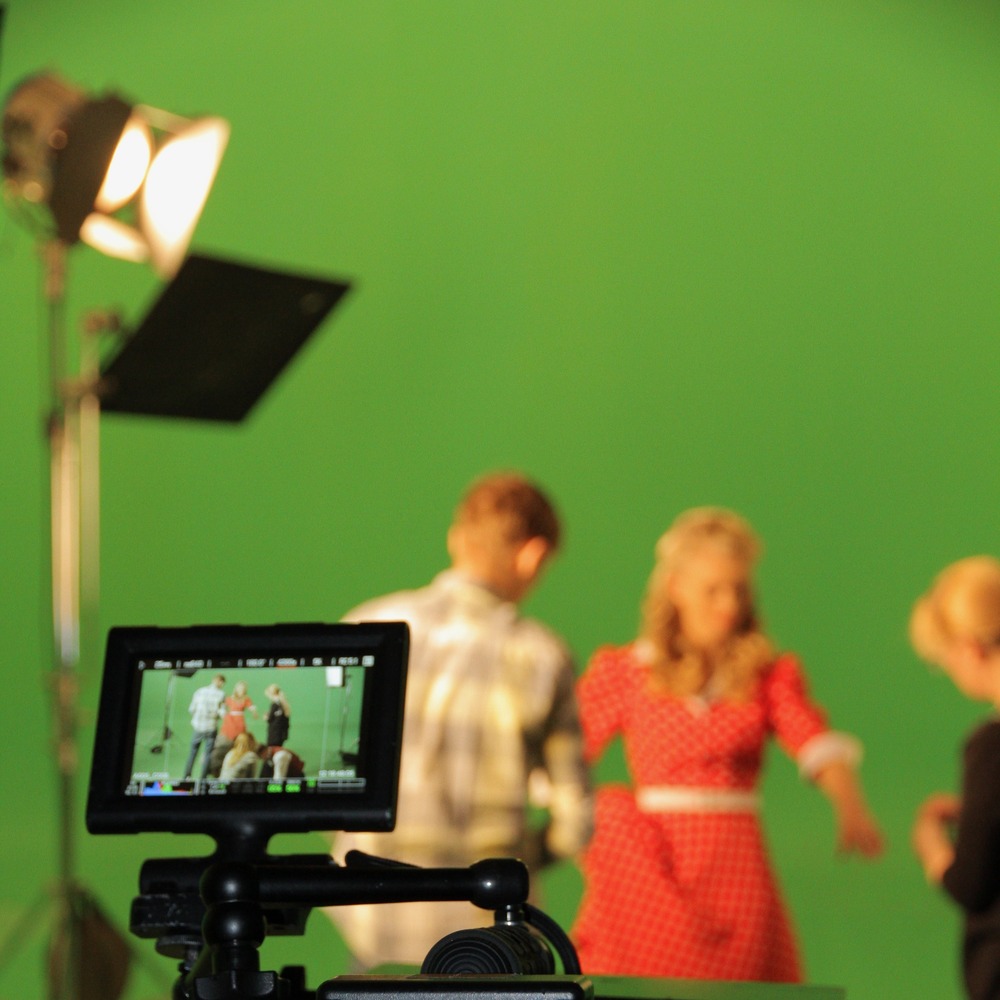
At its core, green screen photography involves capturing a person or object in front of a solid green (or sometimes blue) background. After the image or video is taken, editing software is used to remove the green color and replace it with a new background—whether that’s a tropical beach, a city skyline, or a digital animation.
Why green? Green is chosen because it’s a color that is rarely found in skin tones or clothing, making it easy for software to separate the subject from the background. Blue is sometimes used as an alternative, depending on the situation.
How It Works
The process behind green screen photography relies on the difference between the green background and everything else in the frame. During editing, the software looks for the specific green color and makes it transparent. Then, a new image or video is placed behind the subject.
This allows creators to transport their subjects to virtually any location without ever leaving the studio. At Pro Shots Photography, expert post-production ensures clean, realistic composites that bring your creative vision to life.
Getting the Lighting Right
One of the most important parts of green screen photography is proper lighting. Without it, even the best editing software can struggle to give clean results.
Here are a few basic lighting tips:
- Evenly light the green screen so it looks flat and smooth. Shadows or bright spots make editing harder.
- Light the subject separately from the background. This prevents shadows from falling on the green screen and helps avoid “color spill,” where green light reflects onto the subject.
- Avoid shiny surfaces on your subject, like reflective glasses or jewelry, as they can reflect the green screen and create editing problems.
Professional studios like Pro Shots Photography have controlled lighting setups specifically designed for chroma key work, ensuring a seamless process from start to finish.
Choosing the Right Equipment
You don’t need high-end studio gear to get started with green screen photography, but using the right tools makes a big difference in quality.
- Camera: A high-resolution camera helps capture sharp details, which makes the editing process easier and more accurate.
- Aperture: Using a narrower aperture (a higher f-number) keeps more of the scene in focus, which helps ensure that both your subject and the green background are sharp.
- Tripod: Keeping the camera steady is especially important when filming video.
- Backdrop: Use a high-quality green screen material that is wrinkle-free. Wrinkles or folds can create shadows and uneven lighting, which complicates the editing process.
If you’re unsure where to begin, working with a studio like Pro Shots Photography can save time and guarantee professional-grade results.
Editing and Replacing the Background
Once the photo or video is taken, editing software is used to replace the green background with a different scene.
Popular software tools include:
- Adobe Photoshop – for editing green screen still images.
- Adobe Premiere Pro or After Effects – for professional video editing.
- DaVinci Resolve and Final Cut Pro – other powerful video editing options.
- Mobile apps – many smartphones now have apps that support basic green screen features for social media videos.
Studios offering professional photo editing services, like Pro Shots Photography, can handle the post-production for you, ensuring your green screen images look polished and realistic.
Real-World Uses of Green Screen Photography
Green screen technology is everywhere—even if you don’t always notice it. Here are some common places you’ll see it:
- Movies and TV Shows: Action scenes, fantasy environments, and weather broadcasts often rely on green screens.
- Virtual Meetings and Events: Many people now use green screens during video calls to add custom virtual backgrounds.
- Online Content and Social Media: YouTubers, influencers, and educators use green screens to create engaging and polished videos from home.
- Commercials and Advertising: Marketers use green screens to quickly change scenes or highlight products in eye-catching ways.
- Photography Studios: Photographers can offer clients multiple background options without leaving the studio.
Want to explore creative portraits, business headshots, or marketing materials using green screen technology? Visit Pro Shots Photography to see how these techniques are applied in real-world projects.
Challenges to Watch Out For
While green screen photography is a useful and creative tool, it’s not without its challenges:
- Color Spill: If the green screen is too bright or too close to the subject, it can reflect green light onto clothing, hair, or skin. This creates a glowing edge that looks unnatural and is hard to fix.
- Shadows and Wrinkles: Any shadows or folds on the green screen can make it difficult to cleanly remove the background in post-production.
- Matching the New Background: Once you replace the background, you still need to make sure the lighting, perspective, and focus match between the subject and the new scene. If they don’t, the final image may look fake or poorly edited.
- Wardrobe Conflicts: Never wear green clothing when filming against a green screen—those areas will also be keyed out and become invisible.
Best Practices for Success
To make the most of your green screen photography:
- Plan your lighting setup carefully.
- Keep the background smooth, clean, and well-lit.
- Position your subject far enough from the green screen (about 4–6 feet) to reduce shadows and spill.
- Use a high-quality keying software that gives you control over edge detail and color correction.
- Take test shots and check your results before moving forward with a full shoot or video.
Alternatively, consider working with a professional studio like Pro Shots Photography for hassle-free, high-quality results tailored to your needs.
Conclusion
Green screen photography is a powerful tool that gives creators the freedom to place their subjects in any setting they can imagine. With the right lighting, camera setup, and software, anyone—from amateur photographers to professional filmmakers—can achieve impressive results.
Whether you’re producing a commercial, a virtual event, or a social media post, green screen techniques can elevate your visual storytelling. If you’re ready to take your project to the next level, Pro Shots Photography offers the experience, technology, and creativity to bring your vision to life.